Week 11: Evidence and Final Package Clinic
Did the feedback land? Does the paper say what you think? Is the package complete?
Today
Session 1 · 50 min
- 0–3 Why a literature check, and why now
- 3–13 Did Week 10’s feedback land?
- 13–17 Write down your claim, before reading
- 17–31 Regex from zero
- 31–44 OpenAlex, and where PRISMA fits
- 44–50 Worked example: one paper, two readings
Session 2 · 50 min
- 0–16 Read your paper and rewrite the claim
- 16–28 Four evidence clinics
- 28–40 The final package, walked through
- 40–48 Fix one thing, log it
- 48–50 Next week: quick-fire and the LLM judge
Bring: your Week 10 Peer Review Card, your Revision Ledger, one claim and its source.
Why a literature check, and why now?
This isn’t a new literature-review assignment. It’s the Week 2 evidence audit, applied to the one kind of source we haven’t inspected yet: published papers.
- A4’s Research Brief must name its input sources.
- Evidence quality and uncertainty is 20% of the A4 mark.
- The brief’s first listed failure mode: “making stronger claims than the evidence supports”.
Papers are the evidence most often cited from the abstract alone. One claim, one source, read properly.
Where today sits in your workflow
Find
OpenAlex: the record, a free PDF, what cites it
Read
full text: methods, results, limitations
Check
regex over text and files
Record
Brief, capsule source list, ledger
Week 2 audited your evidence · Week 8 reran your workflow and fact-checked AI · Week 10 reviewed each other’s work · Week 11 checks the published sources · Week 12 checks an AI critic.
The same question each time: what does this evidence actually support?
Did last week’s feedback land?
Week 10 → your A4, today
3–13 min · 2½ min each
- Show the one piece of advice you got from your Week 10 reviewer.
- Show the ledger entry you wrote for it.
- Show where it changed the package: file, page or figure.
Your Week 10 reviewer answers one question:
“Is that what I meant?”
Three honest answers
| Status | What you show |
|---|---|
| Addressed | The changed page or figure, next to the advice |
| In progress | What you have done, and what still remains before Week 12 |
| Deferred or rejected | The reason, written in the ledger |
“The advice was ___. I addressed / am working on / deferred it: ___. You can see it in ___.”
A reasoned rejection counts as a ledger entry. Silence doesn’t.
Your claim, before you read
Write it down first
13–17 min · on the worksheet
Pick one claim your project relies on, and the source you rely on for it.
Read only the abstract, then write:
“The abstract says ___. I took it to mean ___ for my project, so I was going to ___.”
PhD: a research premise or method choice. Studio: a design decision. A guideline, standard or published precedent is a valid source if that is what your decision rests on. Evidence Clinic Worksheet (PDF)
Regex from zero
A find box that understands patterns
Regex (regular expression) is a short rule that describes a pattern of characters, not a fixed word.
You can use it in:
- VS Code: Find, then the
.*button - Python:
re.findall(r"pattern", text) - Google Sheets:
=REGEXMATCH(A2, "pattern") - the course Regex Lab
It doesn’t work in Google’s search box. That has its own operators.
Where you’ll actually use it
| Job in your project | Example pattern |
|---|---|
| Capsule: check every exported variant file follows the README’s naming rule | ^variant_\d{2}\.csv$ |
| Reading: find every temperature reported in a paper’s text | \d+(\.\d+)?\s?°C |
| Data: pull the number out of a messy column (“approx. 0.62 WWR”) | =REGEXEXTRACT(A2, "\d+\.?\d*") in Sheets |
| Literature (PhD): flag records in an export that mention your method | \bthermal imag[a-z]* with i |
Ten minutes of regex can save an hour of scrolling, but only if you check what it missed.
Plain text matches plain text
Four lines of notes:
Pattern shade: predict the matches.
One match: the shade inside “shaded”. It misses “Shade” and “SHADING”, because matching is case-sensitive by default.
Add the flag i (ignore case) and “Shade” joins it. “SHADING” still doesn’t, since it doesn’t contain “shade”.
\b marks the edge of a word
\b means “a word starts or ends here”.
Now: Shade ✓ · shaded ✗ · SHADING ✗ · shadow ✗
Stricter, but now the forms we wanted are missing too.
( | ) means either / or
“shad”, followed by e, ed or ing, then the end of a word.
Shade ✓ · shaded ✓ · SHADING ✓ · shadow ✗
You’ve just written a search for one design term in every form you care about.
Digits and how many
| Piece | Means |
|---|---|
\d |
one digit, 0–9 |
+ |
one or more of the thing before it |
? |
the thing before it is optional |
{2} |
exactly two of the thing before it |
\. |
a real full stop (a bare . means any character) |
\s |
a space |
Pull the temperatures out of your notes
Matches: 2°C and 2.5 °C. Not “25 buildings”, not “0.5 K”.
Useful for scanning a long PDF’s text for every reported value, before you check what each one refers to.
^ and $: the whole line, nothing else
| File | Passes? |
|---|---|
variant_01.csv |
✓ |
variant_1.csv |
✗ only one digit |
Variant_03.csv |
✗ capital V |
variant_04.csv.bak |
✗ something after .csv |
Drop the \ before .csv and variant_05xcsv passes too. . means any character.
Parentheses also capture
A reference export (RIS) puts each field on its own tagged line:
The part inside ( ) is returned on its own: 10.1098/rsos.241337, the DOI.
For whole reference libraries, use a reference manager or a RIS parser. Regex is for one specific clean-up. ScienceDirect export help
Your turn
5 min · Regex Lab · predict before you run
- Match shade, shaded and shading, but not shadow.
- Load Numbers with units. Make it also catch temperatures in K.
- Load Filename rule. Make it accept three-digit variants too.
Regex finds characters, not meaning
\bpassive\b matches the first two lines.
- False positive: “not passive” matched, but it’s the opposite claim.
- False negative: “passively cooled” was missed, but it’s relevant.
A match tells you where to look. You still have to read it.
One-slide cheat sheet
| You write | It means |
|---|---|
shade |
those letters, in that order |
\b |
edge of a word |
(a|b) |
a or b, and capture it |
\d · \s · . |
digit · space · any character |
+ · ? · {2} · {2,3} |
one or more · optional · exactly 2 · 2 to 3 |
^ · $ |
start · end (of each line, with flag m) |
\. |
a real full stop |
flag i |
ignore upper/lower case |
Syntax differs slightly between tools. MDN regex guide · Regex Lab
OpenAlex: the paper, the full text, the trail
A free catalogue you can read in the browser
OpenAlex is a free, open index of scholarly works: papers, authors, institutions, citations.
Paste this into a browser tab. You don’t need an account or a key:
One DOI gives you one record: who, when, where, whether it’s free to read, what it cites and what cites it.
Use it when the PDF is paywalled (check oa_url), when you want to know if a paper you cite has been tested or challenged since, or when you’re building a reading list for a chapter.
What comes back (trimmed)
{
  "id": "https://openalex.org/W4406352916",
  "display_name": "Towards carbon neutrality: mapping mass retrofit
                   opportunities in Cambridge, UK",
  "publication_year": 2025,
  "open_access": {
    "is_oa": true,
    "oa_url": "https://royalsocietypublishing.org/rsos/article-pdf/doi/10.1098/rsos.241337/..."
  },
  "cited_by_count": 2,
  "referenced_works_count": 33
}
Retrieved 25 November 2026. Add ?select=id,display_name,open_access,cited_by_count,referenced_works_count to the URL to get only these fields. Counts change as the index updates.
Three fields that do the work
oa_url
A legal free copy of the full text, if one is known.
Before you write “no access”, check here.
referenced_works
What this paper cites.
Go backwards to where its claim comes from.
cites: filter
What cites this paper.
Go forwards: has anyone tested, extended or challenged it?
Forward from the shared paper
filter=cites:W4406352916 returns 2 works:
- District Heating in High-rise Buildings: A Sociotechnical Approach to Reduce Fuel Poverty (2025)
- Heat as a service as a viable decarbonisation strategy and energy cost affordability in the UK (2026)
Judging by the titles alone, neither seems to retest the thermal-imaging method. If that holds when you open them, it tells you something too: nobody has checked the method yet, as far as this index shows.
Retrieved 25 November 2026. “Not in the index” is not the same as “does not exist”. Check one other source (e.g. Google Scholar’s “Cited by”) before relying on it.
Your turn: run it on your own source
4 min · browser tab · within 31–44
https://api.openalex.org/works/doi:YOUR-DOI- Write down: the OpenAlex ID,
oa_url(or “none”), cited by and references counts. - Open the
cites:list. Note one title worth checking later.
No DOI? Search by title: https://api.openalex.org/works?search=your title words. Compare authors and year before accepting a match.
A free API key raises the request limit and is only needed for heavier scripted use. Setup and private-key instructions
What a record can’t tell you
- whether the paper is good
- whether it supports your claim
- the conditions behind its result
Some records are also missing an abstract, have the wrong metadata, or match the wrong paper.
OpenAlex gets you to the paper. Only reading it tells you what it says.
Where the trail leads: PRISMA
When you review many papers, readers need to know how you chose them.
PRISMA 2020 is the standard way to report that for a systematic review: a 27-item checklist and a flow diagram.
Identification
records found, by source
Screening
records excluded, with reasons
Included
studies in the review
Today’s trail is the first box
For the shared paper, OpenAlex gave us:
- 33 works it cites
- 2 works citing it
= 35 records identified by citation searching, one source, 25 Nov 2026.
Screening: not done.
Included: not done.
Never fill a box you didn’t do, not even with a zero.
PhD: a review chapter will need the full diagram, so start the log now: query, date, source, counts. Studio: when a review paper shows this diagram, it tells you how its sources were chosen, which is worth checking before you cite it.
Worked example: one paper, two readings
The abstract-level view
Mora & Bardhan (2025) propose a proof-of-concept framework to prioritise mass retrofit, combining neighbourhood open data with building-scale thermal imaging.
Our use: a studio proposal ranks the houses on a street for retrofit using thermal images.
What would you need to know first? Write it down.
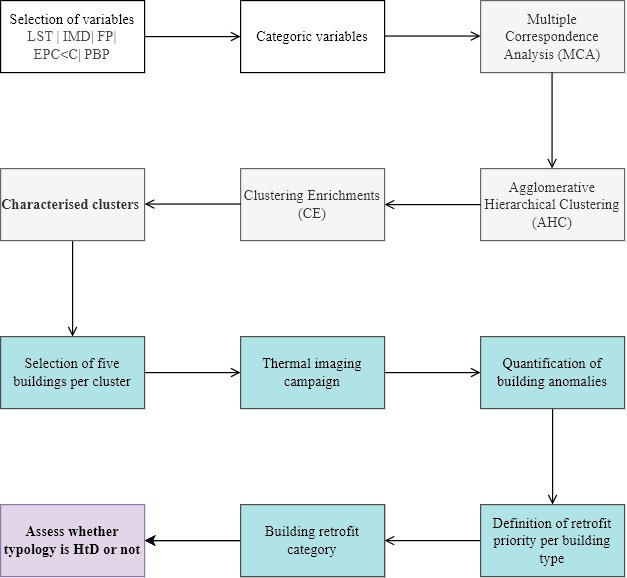
Mora, H. & Bardhan, R. (2025). Towards carbon neutrality: mapping mass retrofit opportunities in Cambridge, UK. R. Soc. Open Sci. 12: 241337. doi:10.1098/rsos.241337 · Fig. 2, CC BY 4.0. “Our use” is a course scenario, not the authors’ claim.
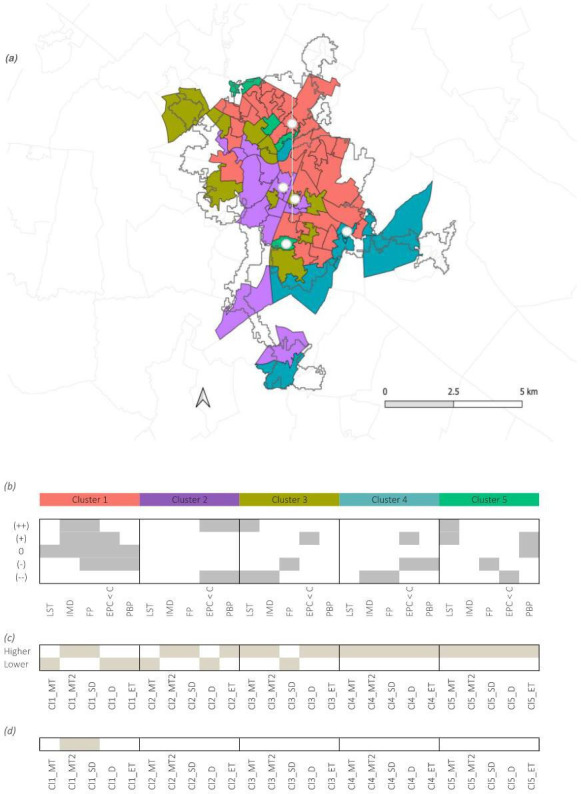
25 buildings.
Five per cluster, surveyed at the white dots on the map (§3.1.3).
Row (c) gives each one a retrofit priority. That’s the ranking our studio use wanted.
But thermostat settings and occupancy schedules were unknown during the survey (§4.4).
Fig. 7, Mora & Bardhan (2025), CC BY 4.0. (a) clusters and survey locations; (b) cluster enrichment; (c) building retrofit priority; (d) hard-to-decarbonise classification.
What the full text changes
Before: thermal images can rank which house to retrofit first.
Found: a 25-building survey of living rooms, without knowing how the houses were heated during the survey (§3.1.3, §4.4).
After: use thermal imaging to choose which houses to inspect, not to rank them, unless heating conditions are controlled or recorded.
The paper isn’t wrong. Our use of it was wider than its evidence.
Session 2 · Read, revise, walk through
Read your own paper
12 min · full text · then 4 min to rewrite
| Look in | Ask |
|---|---|
| Methods | What was studied, where, how many, under what conditions? |
| Results | Which measure, compared with what? |
| Figures/tables | What variation or exception does the abstract leave out? |
| Limitations | Where do the authors restrict their own claim? |
Write down a section, page or figure number for each point. A link alone isn’t evidence.
Before · Found · After
Before: I used ___ to justify ___.
Found: §/fig. ___ shows ___ under ___. It doesn’t establish ___.
After: I can now claim ___, so I will keep / narrow / change ___ and check ___ next.
Supported as stated · Needs narrowing · Contradicted · Not yet established
If your claim survives, say why. That counts as a result.
Four evidence clinics
12 min · 3 min each
1½ min: author shows Before · Found · After, with the location.
1½ min: the room asks one question:
“What does your project do differently now that you know how the result was produced?”
The author writes down the question and their answer (accept / adapt / defer / reject) in the ledger.
The final package, walked through
Six components, and what “done” looks like
| Component | Done when… |
|---|---|
| Practice Case · 2 slides | A critic sees the decision and recommendation in 10 seconds |
| Research Brief · 2 pages | Method, sources and uncertainty are stated, with page/figure locations for key sources |
| Object Card · 1 page | One figure carries the recommendation and one visible limit |
| Reproducibility Capsule | Someone else reruns it and gets your key figure |
| Feedback + Revision Ledger · ≥3 | Each entry: advice → response → change or reason |
| Reflection Note · 1 page | What changed, what didn’t, what transfers |
A4 brief · Final Package Checklist · due end of Week 12. Requirements and weights unchanged.
One thread runs through all six
decision → evidence → comparison → action → limit
A reader should be able to follow that thread from the Object Card alone, then confirm it in the Brief and rerun it from the Capsule.
Next week the LLM judge only sees your Object Card. Make sure the thread is visible there.
Where today’s work goes
| Today you did… | It goes into… |
|---|---|
| Feedback receipt check | Ledger: status of each Week 10 entry |
| Before · Found · After | Brief: source use and limits · Object Card: the caveat |
| OpenAlex record | Capsule source list: DOI, OpenAlex ID, date retrieved |
| Regex filename / value check | Capsule verification notes |
| Evidence clinic question | Ledger: a new entry |
The capsule rerun test
Before Week 12, swap capsules with a partner:
- Unzip on their machine.
- Follow only the README.
- Do you get the key figure?
If not, record the exact step where it broke. That’s a ledger entry and a fix.
Keep API keys and passwords out of the capsule.
Fix one thing, log it
8 min
Pick the weakest component from the checklist, or the gap your clinic exposed.
Change it now. Write the ledger line:
“___ said ___. I changed ___ / I didn’t, because ___.”
Next week: quick-fire, then the judge
- 4-minute quick-fire of your package, then questions from the room
- An LLM reads your Object Card and critiques it
- We judge the judge. Is each point grounded, off-target or made up?
- You decide what to act on. That becomes your last ledger entry.
Bring: your final Object Card as a PDF. You’ll be asked before class whether it may be sent to the LLM; you can opt out and get a human-only review instead. No scores come from the LLM.
Exit line
“I thought ___. Reading ___ showed ___. In my package I’ve now changed ___. Still to do before Week 12: ___.”
Post it under your Object Card draft.